
Supabase Integration
Every Codepup AI project comes with a fully managed Supabase backend - out of the box, automatically, with zero setup on your end.
You do not need a Supabase account. You do not need to configure anything. Codepup AI handles everything for you under the hood.
Zero Setup Required Fully Managed PostgreSQL Database Auth IncludedVideo Walkthrough
Section titled “Video Walkthrough”Watch the full Supabase integration walkthrough to see how Codepup AI manages your backend automatically:
How It Works
Section titled “How It Works”CodePup AI handles Supabase project setup and management seamlessly. When you create a new project on Codepup AI, a dedicated Supabase project is automatically provisioned for you in the background - instantly, without any action needed from you.
This means:
- You never need to create a Supabase account
- You never need to connect or configure anything manually
- Your database, authentication, and storage are ready the moment your project is generated
- Everything is managed, maintained, and secured by Codepup AI
Think of it like getting a fully equipped kitchen when you move into a new apartment - you don’t need to install the plumbing. It’s already there and working.
What Is Included Automatically
Section titled “What Is Included Automatically”Every Codepup AI project that requires a backend gets the following Supabase features provisioned automatically:
| Feature | What It Does |
|---|---|
| PostgreSQL Database | A full relational database for storing your app’s data - products, users, orders, and more |
| User Authentication | Sign-up, login, and session management - ready to use out of the box |
| File Storage | Upload and serve images, videos, and files directly from your project |
| Real-time Updates | Live data streaming for features like chat, notifications, and activity feeds |
| Edge Functions | Serverless backend logic for payments, emails, and third-party API calls |
| Row Level Security | Data access policies so users can only access their own data |
You Don’t Need to Do Anything
Section titled “You Don’t Need to Do Anything”Unlike other platforms where you connect your own Supabase account, Codepup AI fully owns and manages the Supabase infrastructure for you.
This is intentional - it means:
- Faster setup - your backend is ready in seconds when your project is generated
- No configuration errors - Codepup AI knows exactly how to wire everything together
- No maintenance burden - you focus on building your product, not managing infrastructure
- Consistent security - all projects follow the same security standards managed by Codepup AI
Project Limit
Section titled “Project Limit”Each Codepup AI account can create up to 10 projects. Each project gets its own dedicated Supabase backend managed by Codepup AI.
| Plan | Projects Allowed |
|---|---|
| All Users | Up to 10 projects |
What Happens When You Build a Project
Section titled “What Happens When You Build a Project”Here is what happens behind the scenes the moment you generate a project on Codepup AI:
- Codepup AI creates a new Supabase project for you.
- A PostgreSQL database is provisioned and the required tables are created based on your project type
- Authentication is configured and wired into your app’s login and signup flows
- Storage are set up if your project requires file uploads
- Edge functions are deployed for payment processing, email sending, or any other backend logic
- Row Level Security policies are applied so user data stays private and protected
All of this happens in the background while Codepup AI builds your project. By the time your website is ready, the entire backend is already live and connected.
Managing Your Data
Section titled “Managing Your Data”Even though Codepup AI manages the Supabase infrastructure, you still have full control over your content and data through the Codepup AI CMS.
From the CMS you can:
- View all your database tables
- Add, edit, or delete records
- Use the AI Assistant to bulk-insert data in plain English
- See your data update live on your website instantly
You never need to touch Supabase directly - the CMS is your window into your database.
Manage Your Projects
Section titled “Manage Your Projects”Each Codepup AI account can have up to 10 active projects at a time.
If you reach the project limit, you can pause an existing project to free up a slot and create a new one.
How to Pause a Project
Section titled “How to Pause a Project”When you hit the 10 project limit, you will see a triple-dot menu (⋯) next to each project on the home page project list.
- Go to the Projects list on the home page
- Click the triple-dot menu (⋯) on the project you want to pause
- Click Pause Project
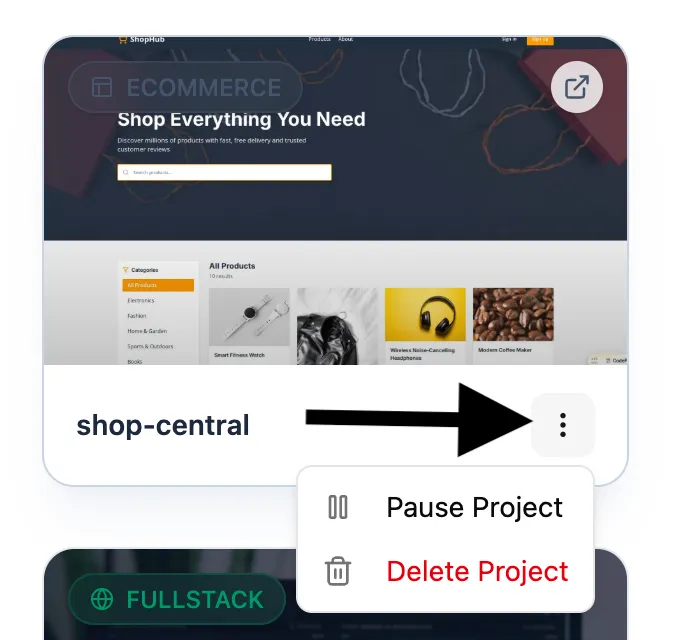
Once paused, the project becomes inactive and frees up a project slot, allowing you to create a new project.
What Happens When a Project Is Paused
Section titled “What Happens When a Project Is Paused”When a project is paused, parts of the system are temporarily disabled.
| Component | Status When Paused |
|---|---|
| AI CMS | Disabled |
| User Flows (Sign-in, Orders, etc.) | Paused |
| Frontend Website | Still accessible |
| Project Slot Usage | Released so you can create another project |
This ensures your resources are freed while keeping the project available to resume later.
How to Resume a Project
Section titled “How to Resume a Project”If you want to activate a paused project again:
- Go to your Projects list
- Click the triple-dot menu (⋯) on the paused project
- Select Resume Project
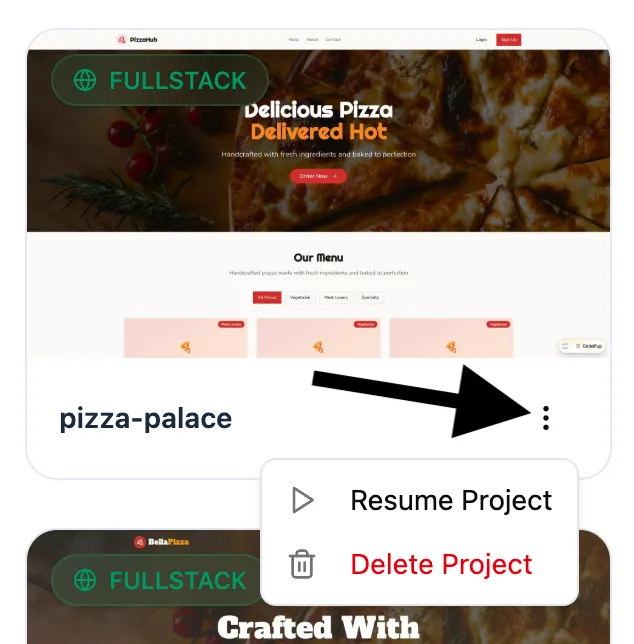
After resuming, the project will become fully active again and all systems including AI CMS and user flows will start working normally.
Pausing projects is useful when you want to:
- Free up space to experiment with new ideas
- Temporarily stop inactive or testing projects
- Manage multiple projects within the 10-project limit
You can pause and resume projects anytime depending on what you’re actively working on.
Your backend is taken care of - just focus on building