
Resend Integration
Resend Integration
Section titled “Resend Integration”Send reliable, production-ready emails from your Codepup AI project using Resend.
With Resend integration, Codepup AI automatically connects your project to a modern email delivery system - no SMTP setup, no boilerplate, no extra infrastructure.
Transactional Emails High Deliverability Auto ConfiguredWhat Is Resend?
Section titled “What Is Resend?”Resend is a modern email API built for developers, focused on excellent deliverability and a simple API.
With Codepup AI + Resend, you can send:
- Authentication emails (OTP, magic links)
- Order confirmation emails
- Contact form submissions
- Notifications and alerts
- System-generated emails from your app
Before You Start
Section titled “Before You Start”Make sure you have:
- A Resend account - sign up at resend.com
- At least one verified sender email or domain in Resend
How Resend Integration Works in Codepup AI
Section titled “How Resend Integration Works in Codepup AI”- Create an API key in your Resend dashboard
- Select E-Commerce Store when starting your Codepup AI project
- Enter your Resend API key alongside your Stripe key in the keys input screen
- Codepup AI wires email functionality into your project automatically
- Emails are sent securely via Resend from your verified sender
Step-by-Step Setup
Section titled “Step-by-Step Setup”Step 1 - Create a Resend API Key
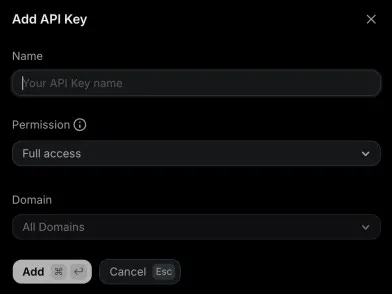
Section titled “Step 1 - Create a Resend API Key”- Log in to your Resend Dashboard at resend.com
- Open API Keys from the left sidebar
- Click Add API Key
- Give it a name (e.g.
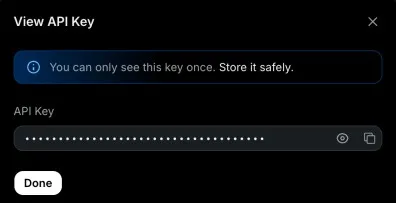
Codepup AI-project) - Copy the generated key - it starts with
re_...
Step 2 - Configure a Verified Sender in Resend
Section titled “Step 2 - Configure a Verified Sender in Resend”Before emails can be sent, you need to verify a sender in your Resend dashboard.
You can verify:
- A single email address (e.g.
no-reply@yourdomain.com) - quick to set up - An entire domain (e.g.
yourdomain.com) - recommended for production
This verified sender email is used automatically by Codepup AI when sending emails from your project.
Step 3 - Enter Your Resend Key in Codepup AI
Section titled “Step 3 - Enter Your Resend Key in Codepup AI”When starting a new project on Codepup AI, type your project idea in the prompt box and select E-Commerce Store (fullstack + payment + email integration).
Codepup AI will show a keys input screen asking for both your Stripe Secret Key and your Resend API Key before building begins.
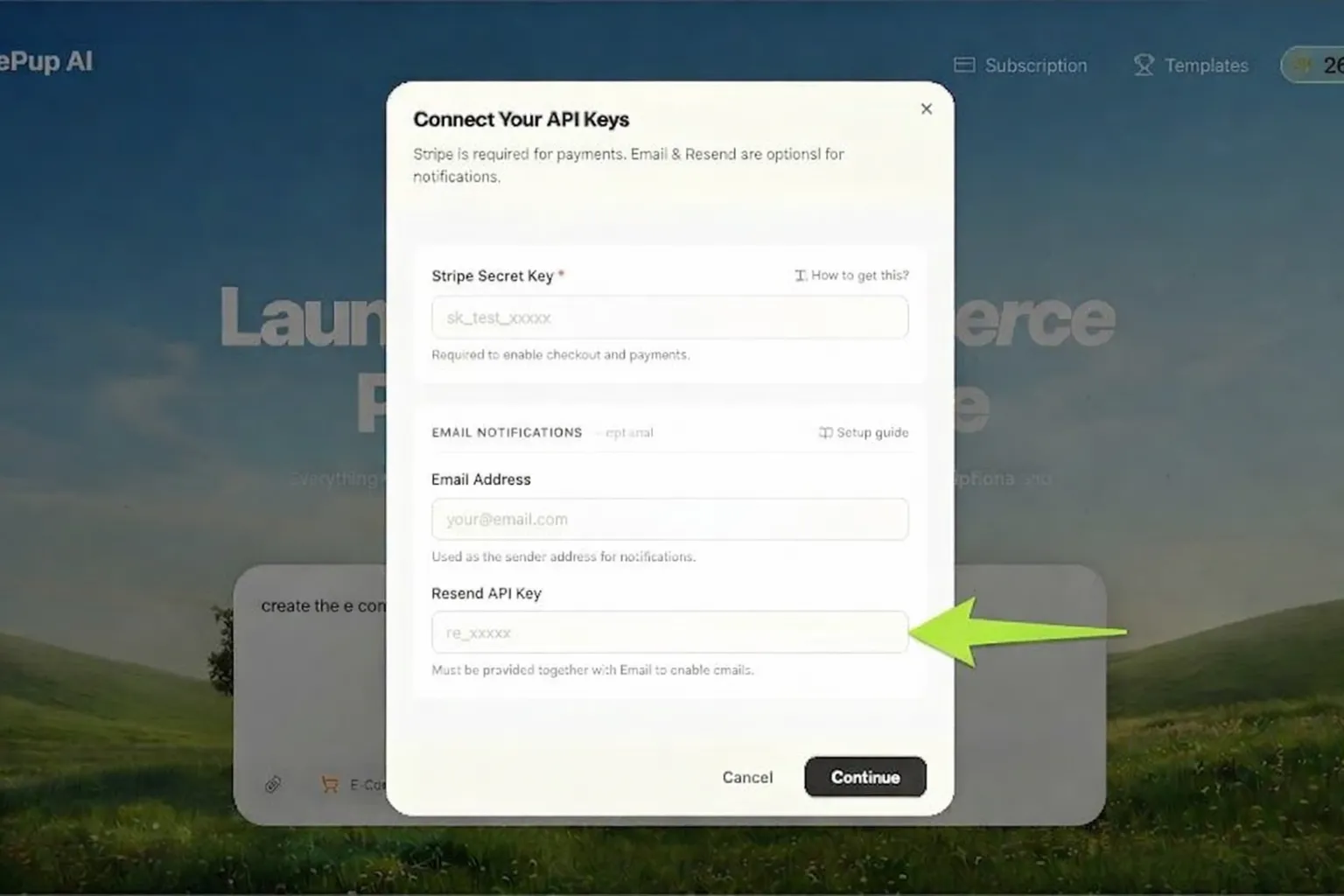
Enter your Resend API key in the Resend API Key field and click Proceed.
Step 4 - Codepup AI Wires Everything Automatically
Section titled “Step 4 - Codepup AI Wires Everything Automatically”Once your keys are entered and the project is generated, Codepup AI automatically:
- Connects your project to the Resend API
- Sets up email sending for order confirmations, contact forms, and authentication flows
- Stores your API key securely as an environment variable
You do not need to write any email code or configure SMTP manually.
What Emails Get Sent Automatically
Section titled “What Emails Get Sent Automatically”Once connected, Codepup AI enables email sending for:
| Email Type | Trigger |
|---|---|
| Order Confirmation | Customer places an order |
| Authentication / OTP | User signs up or logs in |
| Contact Form | Visitor submits the contact form |
| App Notifications | Workflow-triggered system events |
Environment Variables (Auto-Managed)
Section titled “Environment Variables (Auto-Managed)”Codepup AI securely manages the required environment variables for you - you never need to set these manually:
RESEND_API_KEY=re_xxxxxxxxxxxxxxxxxxxx
FROM_EMAIL=no-reply@yourdomain.com