
Version Control
Version Control
Codepup AI includes Version Control, allowing you to instantly explore your project’s history and restore older versions whenever needed. Up to 20 recent versions are automatically saved as you build.
Why This Matters
Section titled “Why This Matters”Every regeneration or code edit automatically creates a new snapshot, giving you a safe restore point at every step of your project’s evolution.
How to Use Version Control
Section titled “How to Use Version Control”-
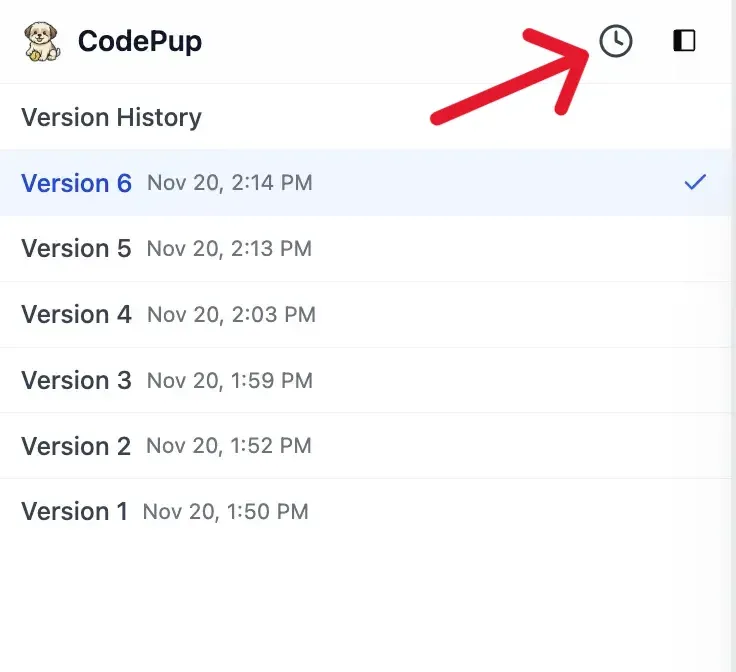
Open your project in Codepup AI and navigate to the Version Control panel in the left sidebar.
-
You will see a list of saved versions, each showing:
- Timestamp
- Version label
-
Click on any older version you want to restore.
-
Within seconds, your entire project regenerates to that earlier state -
no manual copying, no digging through code, no rework.
Updating Your Live Published Site
Section titled “Updating Your Live Published Site”If your project is already published, restoring or switching to any previous version will not automatically update your live link.
To apply the restored version to your existing published site:
-
After restoring your desired version, open the Publish or Share section.
-
Click Generate Shareable URL.
-
The same live link will update with the newly selected version.
-
Your URL stays the same - only the project version reflected on that link changes.
Work Fearlessly
Section titled “Work Fearlessly”If you don’t like a change, spot an issue, or want to switch directions,
simply open Version Control and restore the version you want.
Experiment freely - Codepup AI always has your back.